3D Resin AirPods Max Case vs Smart Case Auto‑Sleep
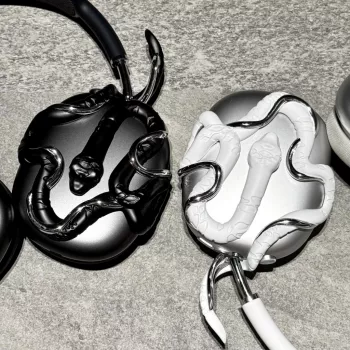
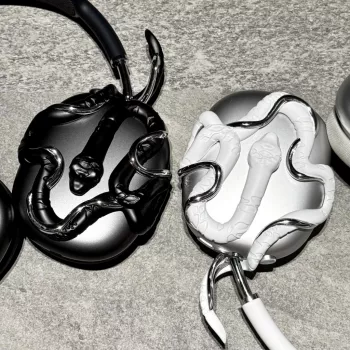
Does a 3D resin AirPods Max case work with Apple’s Smart Case and auto-sleep feature?
Usually, not perfectly. Apple’s Smart Case triggers AirPods Max’s ultra-low-power mode by bringing the ear cups into a very specific folded position and aligning magnets in the case with sensors in the headphones. A rigid 3D resin shell adds thickness and can slightly change how the ear cups rotate, sit, and “nest” inside the Smart Case, which may prevent the magnets from lining up as intended.
In practical terms, a 3D resin case may still let the headphones fit into the Smart Case, but auto-sleep can become inconsistent—especially if the resin design is bulky, has raised details, or restricts the hinge movement. If the cups don’t fully seat or the case can’t close cleanly, the headphones may stay in a higher power state than expected.
How to tell if auto-sleep is actually working
After placing AirPods Max into the Smart Case (with the resin case installed), check your iPhone’s Bluetooth device info and see whether the status changes as expected after a short wait. If you notice faster battery drain, frequent reconnections, or the Smart Case feels forced shut, the resin case is likely interfering with the intended magnetic alignment.
Best way to keep the Smart Case feature reliable
If auto-sleep reliability is the priority, use the Smart Case without a hard shell—or choose a resin case specifically designed to be Smart Case compatible (thin walls, open hinge areas, and minimal protrusions around the cups). For fit notes, handling tips, and care guidance for 3D resin styles, see the full guide here: 3D Resin AirPods Max Case Fit & Care Guide.
For 3D Resin AirPods Max Case vs Smart Case Auto‑Sleep, the best answer depends on fit, material, care instructions, and how the product will be used day to day.
FAQ
Will a 3D resin case scratch my AirPods Max?
A properly fitted resin case shouldn’t scratch, but trapped dust or grit can. Keep both the headphones and the inside of the case clean, and avoid snapping the shell on/off over debris.














Leave a comment