3D Resin AirPods Max Case: Sensor & Auto‑Pause Issues?
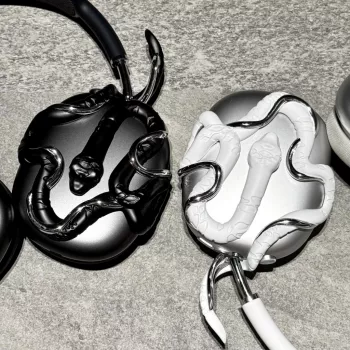
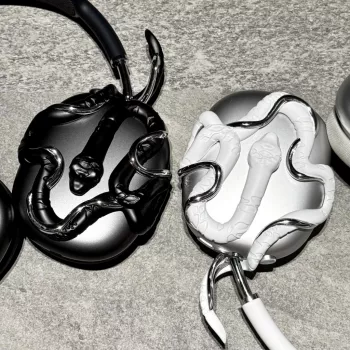
Does a 3D resin AirPods Max case interfere with the headphone sensors for wear detection and auto-pause?
In most situations, a properly designed 3D resin AirPods Max case won’t interfere with wear detection or auto-pause—because the sensors that handle on-head detection are located inside the ear cups, not on the exterior shell. A decorative resin cover primarily changes the outside surface, so the headphone’s ability to sense when it’s being worn typically stays intact.
Where problems can show up is fit and alignment. If a resin case is too thick around the ear cup rim, presses against moving parts, or subtly shifts how the ear cushions sit, it can affect the seal and positioning. That can lead to inconsistent behavior, like auto-pause triggering when it shouldn’t, or not triggering when you take the headphones off.
What to look for in a sensor-friendly resin case
Choose a case with precise cutouts and a snug fit that doesn’t creep toward the cushion edge. Avoid designs that add bulk near the openings, buttons, dial, or areas where the cups rotate. After installing, rotate both ear cups through their full range and make sure nothing rubs or binds.
Quick test after installing the case
Put the AirPods Max on, start audio, then lift one cup off your ear and see if playback pauses normally. Repeat a few times and also test after lightly adjusting the headband. If behavior becomes inconsistent, remove the case and re-test—if the issue disappears, the case fit is the cause.
For fit notes, care tips, and what to check before committing to a 3D resin cover, see the main guide here: https://marvellene.com/guide-alien-snake-3d-resin-airpods-max-case-fit-care/.
FAQ
Can a 3D resin case affect the Digital Crown or noise control button?
It can if the case crowds the control area or shifts over time. A well-fitted case leaves clear space around the Digital Crown and button so clicks and rotation feel normal.














Leave a comment