Do Resin AirPods Max Cases Disrupt Bluetooth?
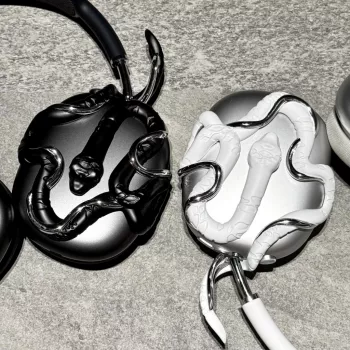
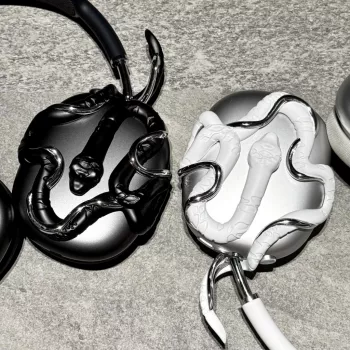
Will a 3D resin AirPods Max case affect Bluetooth signal strength or connection stability?
In most real-world use, a 3D resin AirPods Max case should not noticeably weaken Bluetooth signal strength or make connections unstable. Bluetooth relies on radio waves that typically pass through non-metal materials such as resin without major attenuation, especially at the short distances common between headphones and a phone or laptop.
Where problems can show up is less about “resin” and more about what’s built into the case and how it fits. Metallic paint, foil accents, embedded magnets, or thick multi-layer decorative elements can interfere more than plain resin, and a case that presses on buttons or sensors can create symptoms that feel like connectivity issues (random pausing, missed inputs, or inconsistent noise control changes).
What can cause issues with a resin case?
Metal components and finishes
If the design includes metal plates, heavy metallic pigments, or conductive coatings, it can partially block or scatter radio signals. This is the most common reason a decorative case might correlate with shorter range or occasional dropouts.
Overly tight fit or misalignment
A rigid 3D case that’s slightly off-spec can put pressure on the ear cups, Digital Crown, or buttons. That can lead to odd behavior that’s easy to confuse with a “bad connection,” even though Bluetooth is fine.
Charging and sleep behavior confusion
Some cases change how you store the headphones or use accessories, which can affect battery state and reconnection timing. A low battery or frequent sleep/wake cycles can feel like instability.
How to keep signal and stability strong
Choose a case made from non-metal resin with minimal metallic decoration, and make sure the cutouts and edges don’t press on controls. After installing, test range in a typical room, then re-pair the headphones once if anything seems off. For fit and care specifics, see the full guide here: https://marvellene.com/guide-alien-snake-3d-resin-airpods-max-case-fit-care/.
FAQ
Can a tight AirPods Max case damage the headphones over time?
A very rigid, tight case can cause cosmetic wear, stress points, or pressure on buttons and rotating parts. If you notice scuffs, sticking controls, or uneven seams, switch to a better-fitting case.













Leave a comment